 saasprokit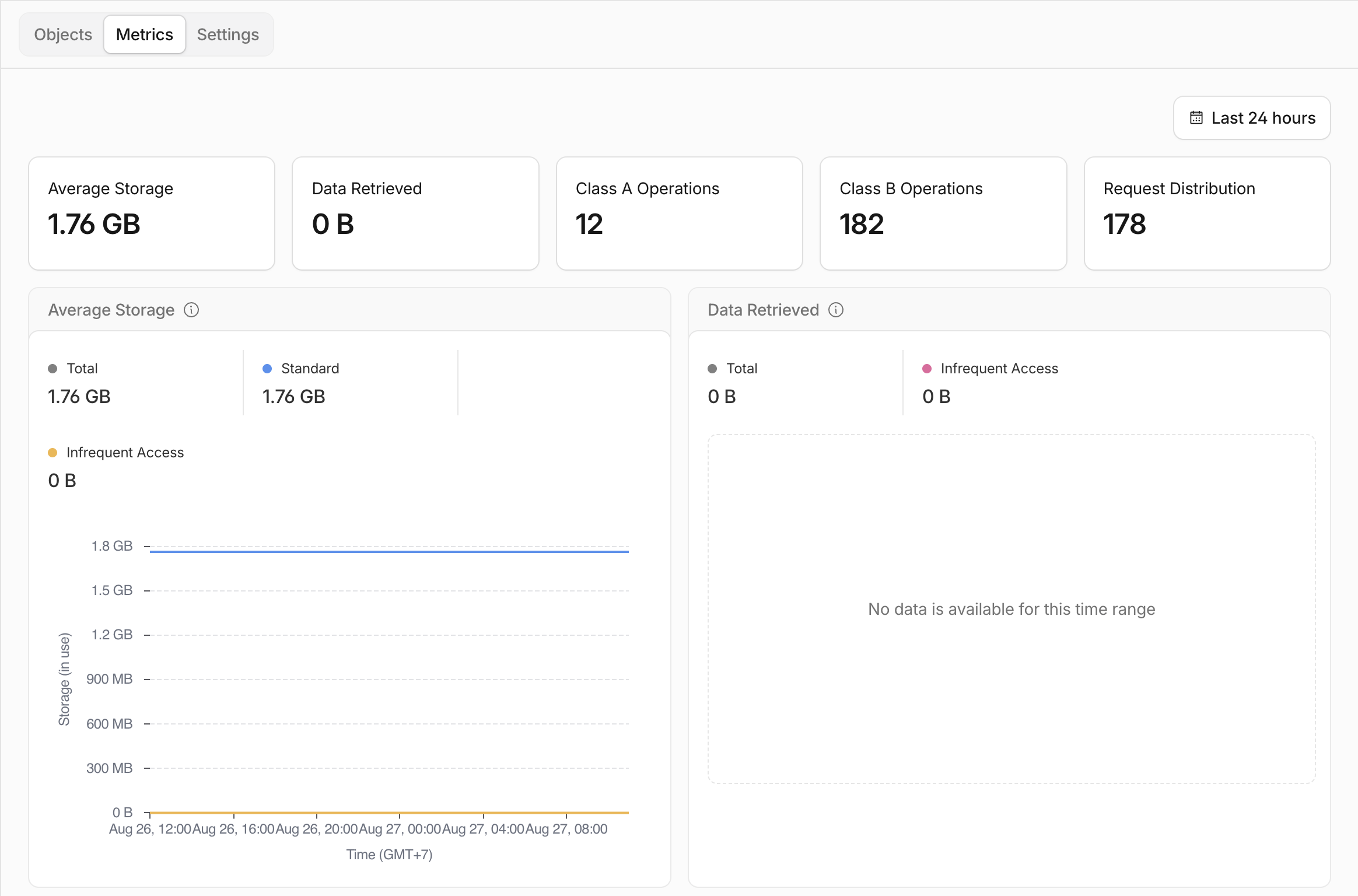
This site runs on Cloudflare Workers with Next.js. It has no user uploads, no ISR, and no revalidation. Every page is built from MDX at build time. So nothing on this site should write to storage while it runs.
Still, its R2 cache bucket reached 1.76 GB and about 4,000 objects. The chart at the top of this post shows the whole month: nothing until August 17, then a steep climb to 1.76 GB by August 24. That is about 250 MB per day. I still do not know why it started on the 17th and not on launch day, August 2. My guess is that the scanners found the domain around then. I have not checked.
This cost me nothing, by the way. 1.76 GB is inside R2's free tier. What bothered me was how a site with nothing to store managed to fill a bucket, and what the same code would do on a server where the cache writes to disk.
What was in the bucket
The object names told the story right away:
wp-configs.php.cache
.env.preprod.cache
privatekey.key.cache
wp-config.php.bak.cache
These are bot requests. Bots scan every domain on the internet looking for leaked config files. Around 87% of the objects in the bucket were this kind of request. The other 13% were the real pages of the site, which is the only thing the cache was supposed to hold.
Each object was about 446 KB. That is a lot for a "not found" page. Inside was a JSON file with the HTML (124 KB), the React Server Components payload (100 KB), and the segment data (199 KB). So each of these was a full page render that happened to end in a 404.
Why the page was rendered
The site supports six languages, so the URL root is a dynamic segment:
app/[locale]/. The layout tells Next which locales exist, and Next builds
all six pages at build time:
export function generateStaticParams() {
  return locales.map((locale) => ({ locale }));
}
Now follow a request for /wp-configs.php.
The middleware runs first. Normally it rewrites /blog to /en/blog, so
the router always sees a locale. But it skips this step for any path with a
dot in it, so that /robots.txt does not become /en/robots.txt. That
means /wp-configs.php skips the rewrite too.
The router then matches it against app/[locale]/. The first segment is
wp-configs.php, so locale = "wp-configs.php". That is not one of the six
locales. What does Next do with a value it did not build?
The answer depends on one setting: dynamicParams. Its default is true,
which means: render the unknown value on demand, then cache the result like a
static page. This default exists for blogs. If you publish a new post after
the last build, the first visitor triggers one render and everyone after
gets the cached page. That is good for a blog slug. It is bad for a locale.
So the layout ran, with fonts, providers, and JSON-LD. Then it checked the
locale, saw it was wrong, and called notFound(). Next rendered the 404
page and cached it. There was no revalidate value, so "cached" meant
"forever". A closely related
GitHub issue about dynamic
routes caching their notFound() result is closed as "not planned". This is
how the cache is designed to work.
The cache adapter was OpenNext's R2 cache, so "cache forever" meant "write 446 KB to a bucket and never delete it". Every new bot URL was a new key. Bots do not repeat themselves. One week later: 1.76 GB.
Nothing was wrong on its own
No single line here was a mistake.
The R2 cache was correct. It came from the SaaS kit this site is built on,
where the app has dashboards, changing data, and real revalidatePath calls
that need a writable cache.
The dynamicParams default was correct. It is the right default for most
routes.
The dot check in the middleware was correct. Rewriting /sitemap.xml to
/en/sitemap.xml would break the sitemap.
Together, they turned every bot request into a permanent 446 KB object. Nothing failed in development or in tests, and review would not catch it either, because each piece lives in a different file and each one looks fine on its own. The only sign was a storage number that made no sense for this kind of site.
The bug needs two things: a cache that can write and does not expire, and a dynamic segment with a fixed list of valid values that still accepts unknown ones. The third part, a way for junk to reach the segment, is not really a condition. Bots found this site about two weeks after launch, and they would have found yours too.
The fix I almost used
My first plan was a middleware guard. Before the router runs, check the path. If it has a file extension and is not on a list of real files, return a plain-text 404. I had the code ready, with a list of twenty allowed files and eleven path prefixes to skip.
Then I checked the list against the repo. Twelve of the twenty files did not
exist. Three of the prefixes did not exist either. The list came from a
generic playbook, not from this site. Also, on Cloudflare, files in public/
are served by the static assets layer before the Worker runs, so most of the
list could never matter in production.
It was also the wrong layer. A guard in front of the router still leaves the router set up to render and cache any unknown locale. That fixes the symptom and keeps the cause.
A WAF rule has the same problem. Cloudflare can block .php, .env, and
.key before the request reaches the Worker, and this site has that rule.
But bots try every extension: .zip, .json, .yaml, .bak. A block list
never keeps up, and the router behind it is still ready to render and cache
whatever gets through. It helps, but it does not fix anything.
The plan also said the simple fix would not work. It claimed that
dynamicParams = false on the locale layout was wrong, because after the
default-locale rewrite "the first segment is either a locale or a page". I
read the middleware source. The rewrite is internal. The router only sees a
locale-prefixed path for normal URLs. The only requests that reach
[locale] with a wrong value are the bot requests. I had it backwards.
The fix
One line in app/[locale]/layout.tsx, after generateStaticParams:
export const dynamicParams = false;This changes what the router does with an unknown locale. Before: render it and cache the result. After: return 404 without rendering anything. The request stops at the routing layer, before the layout runs.
Four child routes in this app already had this line: blog/[slug],
blog/tags/[tag], and the product pages. That is why /en/does-not-exist
was always a cheap 404. The root segment, the one the bots were hitting, was
the only one without it.
I checked it on a Cloudflare build and a local preview before deploying. The
prerender manifest changed /[locale] from fallback: null to
fallback: false. The two dynamic pages on the site, which read search
params and are never prerendered, were not affected. Next only writes
fallback entries for statically built routes.
The numbers, both measured on production:
| Request | Before | After |
|---|---|---|
/backup.zip | 404, 231 KB | 404, 53 KB |
/config.json | 404, 231 KB | 404, 53 KB |
/.DS_Store | 404, 231 KB | 404, 53 KB |
/, /blog, /robots.txt, /sitemap.xml | 200 | 200 |
The new 404 is exactly the same size as /en/does-not-exist: 53,361 bytes.
Same path through the router, same not-found page, no layout render.
It had already stopped, by accident
Here is the awkward part. When I opened the bucket, it had already stopped growing. You can see it in the chart at the top: the line climbs until August 24, then goes flat. The 24-hour view showed 0 B of data retrieved, so nothing was reading it either.
Six days earlier I had replaced the R2 cache with OpenNext's static assets
cache, a read-only adapter whose set() does nothing. I did that for
a different reason, while working on TTFB.
At the time I wrote that "the cache swap stays, for what it is worth" even
though it "just was not the bottleneck". It was worth about 250 MB a day.
The bucket had been frozen since that deploy.
I got lucky. The router was still rendering a 231 KB page for every bot request and still logging a cache write error for each one. The standalone build of this same app writes its cache to disk on a VPS. Vercel has its own data cache. Anyone deploying this code with a writable cache would get the same leak. The one-line fix is what actually removes the bug.
Check your own app
If you have a [locale] segment at the root, or any dynamic segment with a
fixed list of values, three requests will tell you if you have this problem:
curl -s -o /dev/null -w "%{http_code} %{size_download}\n" https://yoursite.com/backup.zip
curl -s -o /dev/null -w "%{http_code} %{size_download}\n" https://yoursite.com/x.txt
curl -s -o /dev/null -w "%{http_code} %{size_download}\n" https://yoursite.com/en/does-not-exist
If the first two are much larger than the third, your root segment is rendering its 404 pages. Then look for segments that build a fixed list but still accept unknown values:
grep -rn "generateStaticParams" app --include=layout.tsx --include=page.tsx -l \
  | xargs grep -L "dynamicParams"
Each file it prints is worth a look. The setting can also live on a sibling
page.tsx, so not every hit is a real problem. Whether it matters depends
on your cache. If the cache writes and never expires, it matters.
What I learned
A fixed list needs dynamicParams = false. Locales, product slugs,
categories: anything where you know the full set at build time. Leave it
open only when the list really grows at runtime.
Three correct decisions can add up to one wrong system. The failure lives between files, where code review does not look. I only found this one because a number on a dashboard did not match what I knew about the site. When a metric does not make sense, the metric is usually right.
And when a plan says the simple fix will not work, read the source before you believe it. Mine was wrong, and one look at the middleware file was enough to see it.